-
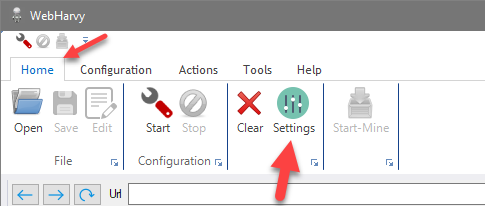
You can setup WebHarvy to scrape websites via Proxy Servers. Scraping via Proxy Servers helps you to maintain a level of anonymity, by hiding your IP, while extracting data from websites. To edit Proxy Settings click the Settings button from the Home menu and select the 'Proxy Settings' tab.
To add a proxy, provide the proxy server details in the 'Add proxy' box and click the '+' button. Proxy details include proxy server address, port and authentication details (if required). You may add multiple proxy servers to the 'Proxy List'.
The following types of proxies are supported.
- HTTP
- HTTPS
- SOCKS4
- SOCKS4a
- SOCKS5
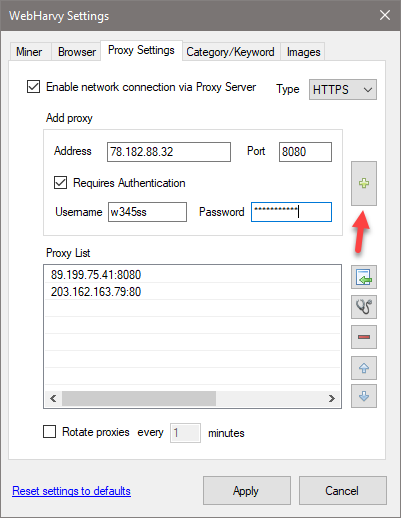
- Either a single proxy server or a list of proxy servers can be used for web scraping. In case you select the 'Rotate proxies' option, WebHarvy will automatically rotate and use each proxy server in the list periodically. Otherwise, the first proxy in the list will be used.
- Proxy Server Recommendations for Web Scraping
- How to anonymously scrape data?
It is recommended that you use paid proxy servers since the free/open proxy servers available are very slow and unreliable, and result in early termination of mining process.
How to edit proxy details?
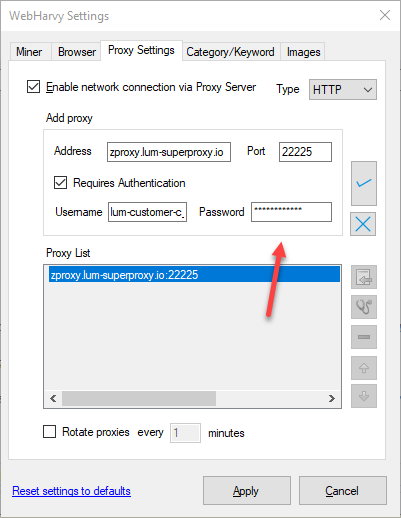
To edit details of a saved proxy, double click on its name displayed in the Proxy List. You can then edit proxy details in the 'Add proxy' section and click on the tick button to apply changes.
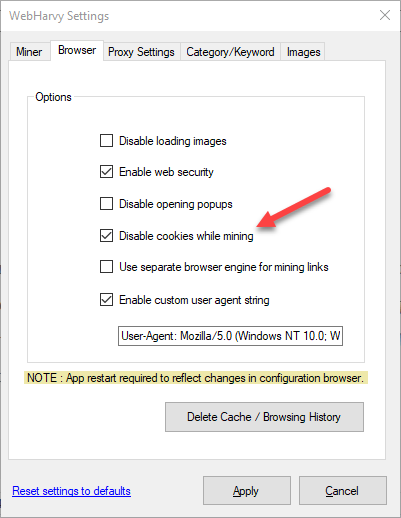
Disable cookies while mining
While using proxy servers for mining, it is recommended that you also enable the 'Disable cookies while mining' option in Browser settings. Websites can get details regarding your previous visits using cookies stored locally by the browser. WebHarvy will periodically delete browser cookies during mining when this option is enabled.
Importing proxies from a file
To import a list of proxy addresses from a file (CSV or Text), click the Import button  . The proxy list file
should have the following format.
. The proxy list file
should have the following format.
Each line of the file will describe a proxy server in the following format :-
proxy-address:port username password
As shown above, a blank space must be used to separate proxy address, username and password. The username and password fields are optional. So in case they are absent only the proxy IP address will be present per line. Each line describes a proxy server. You may also separate proxy server information by commas (,) or semicolons (;) instead of newline (line by line format).
Example Proxy List File :-
89.199.75.41:8080 w343sa pwd123
203.162.168.89:80
195.144.128.14:3128
In the above example, the first proxy has login credentials (username and password), while the last two are open.
Related