When large amounts of data need to be displayed on a web page, it is often impractical to load all the data at once. This can lead to long loading times and a poor user experience. To address this, many websites implement infinite scrolling, where additional content is loaded dynamically as the user scrolls down the page.
Websites employ 2 main techniques to implement infinite scrolling:
- 1. Automatic data loading when user scrolls down the page
- 2. Provide a 'Load More Data' button at the end of the listings, clicking which more data will be loaded.
WebHarvy handles both the above scenarios.
Configuring Infinite Scroll Pagination
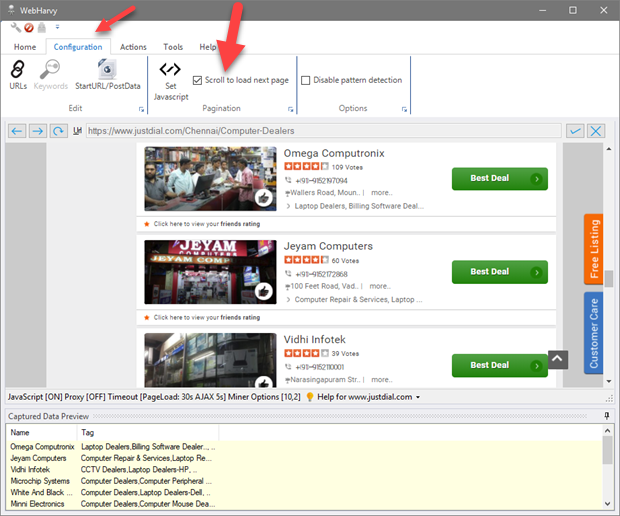
To configure infinite scroll pagination in WebHarvy, during configuration, go to the Configuration menu tab and select the 'Scroll to load next page' option under Pagination section.
Configuring 'Load More' type pagination
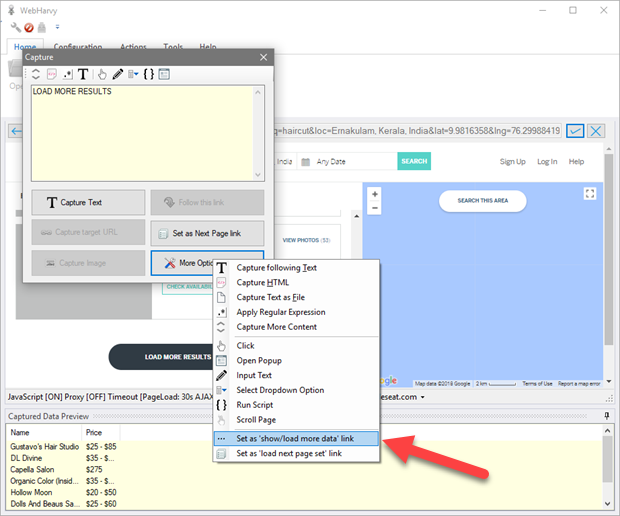
For websites which display more content in the same page when the user clicks a Load More button, during configuration, scroll down the page and click on the 'Load More' button, and from the resulting Capture window, select More Options > Set as 'show/load more data' link option.
In both the above cases, during mining, you can specify the number of pages to load before extracting data.
Handling other types of pagination
WebHarvy handles all types of pagination methods employed by websites including numbered page links, 'Next' buttons, and custom pagination using JavaScript code. To know more please refer the link given below.