support@webharvy.com | sales@webharvy.com | YouTube Channel | KB Articles

.NET Requirement in Windows 8
WebHarvy requires .NET 2.0 to run. .NET 2.0 (along with .NET 3.5) is included by default in most Windows operating systems up to Windows 7. In a fresh Windows 8 installation only .NET 4.5 is included. Please follow the steps below to install .NET 3.5 (along with .NET 2.0) on Windows 8.
To enable the .NET Framework 3.5 on Windows 8
-
Step 1:
- On the Start screen, start to enter Control Panel. As you enter that name, the Control Panel icon appears under the Apps heading.
- Choose the Control Panel icon, choose the Programs icon, and then choose the Turn Windows features on or off link.
- Make sure that the .NET Framework 3.5 (includes .NET 2.0 and 3.0) check box is selected, and then choose the OK button.
Step 2:
Step 3:
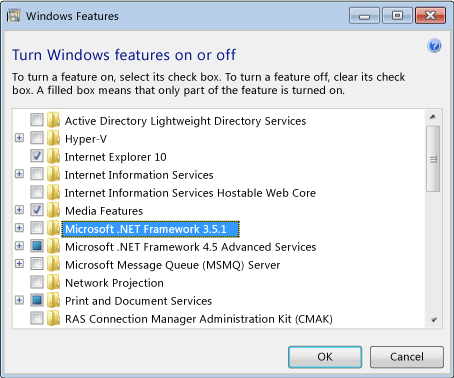
You don't need to select the check boxes for any child nodes for optional components of the .NET Framework.
Reference:
http://msdn.microsoft.com/en-us/library/hh506443.aspx